
Fast, Accurate Search Plugin for Squarespace
Frustrated with Squarespace search?
Meet Monocle.
Exceptional Search. Now with AI Answers.
Exceptional Search. Now with AI Answers.
No credit card required
- Install in minutes and make your site a joy to navigate
- Show all your content, products and member sites and provide AI answers in one beautiful, simple interface
- Enjoy our highly rated personal customer support 🧘♂️
No credit card required
Recommended by top Squarespace experts








Features of a powerful search plugin
Real-Time Search
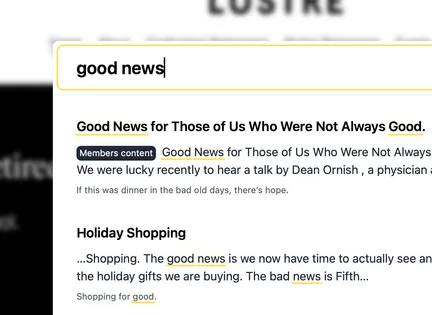
Enter your search query and get results instantly, across all your pages. Our typo-resistant search will show you what you need, even if your fingers were a little too fast.
Member Site Search
Give your paying members more bang for their buck by allowing them to search all your member site content — something that's not possible with Squarespace' search.
And advertise your member content to new users with a customizable label.
AI Answers
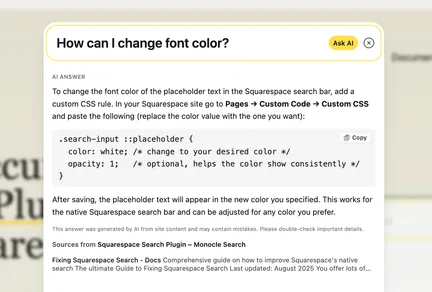
Allow users to interact with your site in new ways.
Ask any questions about the site content and get AI answers right from the search bar.
And a whole lot more
- Customizable Design
- Your site, your style — Monocle is easy to customize so that it's just perfect for your Squarespace site. Activate search from anywhere, use a search bar or button, have a pre-filled search windows and much more!
- Control Search Results
- Not everything is valuable for all visitors. With Monocle, you have full control and can hide landing pages, SEO focused content or anything else from your results.
- Better Product Search
- Add your product catalogues to Monocle and your products immediately become available as compelling product listings with support for faceting and filtering.
- PDF Search
- You offer your content in PDF format? Monocle has got you covered. Like all other content, Monocle will index your PDF files and make them searchable in real-time.
“Love your supercharged search add-on. It’s the best thing we've plugged into Squarespace for our clients this year.”

“Monocle Search is a gamechanger! Lightning quick, super easy to install and fantastic customer service too. 10/10!”

“The search functionality is spectacular and has made the user experience so much better.”
“I don’t know about any other solution which feels as intuitive and natural.”
“The search is working perfectly - I’m super happy and really appreciate your help with this.”

“Things are sweeeeeet! I can’t thank you enough!”

“I really appreciate your attention to detail. Fantastic customer service!”

“Monocle Search allows our readers to zoom in on information they are looking for from our archives. We have also been impressed by the team's warm and efficient support. Thank you!”

“Monocle Search is an exceptional search tool for the Squarespace ecosystem. It streamlines content discovery.”

“Monocle has provided the exact search function I needed for my website to enhance my customers' experience. It was so quick and easy to install and I really appreciated the help and advice I received alongside the installation.”

“Monocle is an effortless, lightning-fast search tool that ensures your visitors find exactly what they’re looking for.”

“I absolutely LOVE your plug-in. It immediately solved all of the problems I was having with Squarespace’s search function!”

“Your customer service and product are elite levels of awesome, guys! You should be very proud.”
“Your extension search is miles ahead of the native SS search bar. Super fast and just brilliant! Thank you!”
“The website search on UVE is Superman fast now! Wow! Thank you so much!”

“Thank you so much for this! Your support is above and beyond!”
“Holy SHEET this is going to be so good for our website!!! I am blown away!”

“Absolutely LOVE the search functionality it adds to our squarespace site. This was something severely lacking in SS and you fixed it!”
Installed in Minutes
Setting up Monocle is super fast — so fast that we can show you the entire process in two minutes!
- Log in with Squarespace
- Enter your email address
- Activate search on your site using any link or button you like
Prices
We want you to be able to use Monocle Search, whatever your situation. If you cannot afford the plan that you need, please contact us at hello@monocle-search.com and we will do our best to find a solution.
Starter
€9/month + taxes
or €90 per year + taxes
Features
- Free 15 day trial
- Real-time search
- Daily crawl
- Crawl on demand
- AI generated answers
Core
€19/month + taxes
or €190 per year + taxes
Features
- Search results with images
- Design editor
- Exclude pages
- Search through PDFs
Professional
€49/month + taxes
or €490 per year + taxes
Features
- Search Lenses
- Search content on Member Sites
- Advanced Product Search
Need a zero-cost option? Use our free tier.(If you don’t choose a paid plan when your trial ends, you’ll be switched to this automatically.)
We still have to cover the bills for servers and bandwidth, so the free tier is pared back to the essentials:
- The same fast, accurate real-time search engine as the paid plans
- Your site will be crawled once per day
- Indexing for up to 500 pages
Heads-up: free users don’t get hands-on or extensive support. Thanks for understanding.
Frequently asked questions
Does Monocle Search work with a Squarespace 7.0 site?
Yes it does! The exact setup steps are slightly different than described in our guide, but you should have no issue getting it to run. And if you do, don't fret - reach out to support@monocle-search.com any time.
How can I make my Member Site content searchable?
Monocle Search is actually the only tool (that we know of - including Squarespace' own search feature!) that can search Member Site content. It only takes a minute to get it running. We have a guide for how to set it up in our help section.
Can I use the Squarespace search bar with Monocle?
Yes, you can! By default, Monocle takes over the Squarespace search bar too. That means: if you already have a search bar included on your site, there is nothing more you need to do - after inserting the Monocle Search script, you'll automatically have an upgraded search using your search bar.
Do you have a bulk discount if I want to have advanced search on several sites?
Yes: For your 3rd and all subsequent subscriptions, you receive 20% off.
I am on the "Personal" plan of Squarespace, so I can't add any code snippets to my site. Will that be a problem with using Monocle?
Worry not! We've got you covered. Monocle Search works with the Personal plan as well. Simply use the "Log in with Squarespace" feature - there is no need to add any code snippets!
What is your cancellation policy?
You can cancel at any point and you can use Monocle until your current billing period runs out.
Are you planning to include feature X?
Quite possibly! If you have specific requirements or recommendations, please reach out to us at hello@monocle-search.com. While we don't have a public roadmap, we're constantly working on improvements for Monocle.
So cool! Does this only work on Squarespace sites?
What a great question! This is a secret at the moment, but in fact, Monocle works on pretty much every site. Having said that, we only offer full support right now if you use it on a Squarespace site.
What are AI generated answers?
Our paid plans offer the ability to let a large language model (LLM) generate answers based on the content of your site. It's a bit like using ChatGPT or Claude, but differs in that the LLM only answers questions about your site and not general knowledge questions.
What do AI generated answers cost?
Our paid plans come with a generous amount of AI usage included. If you exceed the amount included we can optionally continue serving AI answers and will pass the costs (with a markup to cover our overhead) of doing so to you.
What is semantic and hybrid search?
Semantic search is a type of search that uses machine learning to understand the meaning behind the words in a search query, rather than just matching keywords. We use this in addition to classic keyword-based search, a combination that is commonly called hybrid search. This combination allows us to surface results even if the exact keyword being searched for isn't present on the site, for example the a search for the word car where only the word automobile is present on the site.
Where do I enable AI answers on my site?
You can enable AI answers under the AI answers tab in the admin dashboard.


Contact us
If you have any more questions or require help, please contact us at hello@monocle-search.com We would love to hear from you.